
# Ability Sandbox
# Overview
To work with Ability Platform, you need to have access to some instance of it. Normally, when you want to develop a project based on Ability Platform, you'd have to request an instance of the platform to be deployed for you or make use of an instance that your business line already has (more on that here).
Making a decision to request an Ability Platform instance might seem like a huge "venture", possibly a bit of a risk, especially if you've never had any actual contact with the platform and you are not fully sure what to expect of it. Probably it would be really helpful if you had a chance to interact with the platform before you decide to request your instance of it. Exactly for such needs the Client Success Team (CST) has developed a solution called Ability Sandbox.
You can request an access to a platform instance hosted on behalf of CST. During the time-limited access you'll be able to play around, check out the APIS and try to build some proof-of-concept solution. Additionally, a tutorial series is available for you to quickly get up to speed with the knowledge that you should have to understand what the Ability Platform is about and how it works.
WARNING
Keep in mind that Sandbox environments are short-lived. Once you request for it, you will have 20 days of access. After that period, the data is purged.
# Ability Sandbox vs API Playground
If you have looked around the Ability Developer Portal a bit, you might have discovered API Playground. It allows you to experiment with the Ability Platform Instance APIs (Region API is not available in the playground). The differences between API Playground and Ability Sandbox are:
- API Playground is a shared environment, meaning users see each other's entities and are able to modify them. Sandbox gives you your environment that no one else can touch.
- API Playground is cleaned on a weekly schedule (although it is not guaranteed that your entities will not be deleted sooner). Sandbox environment is given to you for an agreed amount of time and only after that time passes, the environment gets cleaned up).
- API Playground is limited to a subset of Instance APIs. Sandbox gives you access to all of them.
- API Playground's Region APIs are not connected to the actual platform instance. Sandbox gives you access to Region APIs.
- API Playground does not give an access to the Admin Portal. Sandbox allows access to it
- API Playground does not allow connecting devices to the platform. Ability Sandbox gives all possibilities to do that.
In general, Sandbox environment is much closer to what your Ability Platform instance would be like. The limitations are:
- you can operate in one (private, not shared with anyone) tenant and are not able to add any other users to it or to create new tenants.
- you get one (private, not shared with anyone) instance-level solution and you cannot create any more solutions.
TIP
In order to learn what a solution or a tenant is, please go to the Multitenancy section of the portal.
These limitations were introduced to create a separation of data between Sandbox users. Each user gets his environment and does not interfere with other users. We believe that the mentioned limitations are not going to be problematic for you while you're starting out and learning Ability-related concepts. If you find a case which makes the imposed limitations problematic, please reach out to us. We will be improving the Ability Sandbox experience based on your feedback!
API Playground for Sandbox users
API Playground also allows you to manually specify the tenant that you want to log into the Playground with. By default, it logs you into the shared environment (as described above). If you provide your private sandbox tenant name and log in, the API Playground will act as a GUI of your private environment - all of the API Playground downsides listed above will not be applicable anymore. You will be able to treat API Playground as an app that is running against your own environment, just like any other app that you could create on your own. Find out more about that here.
# Recommended Path
If you're a new user, we suggest the following path:
- Navigate around this page and read the bits that interest you the most.
- Play with API Playground to check the APIs.
- If the playground is not enough (go back to the comparison list above to see why it might be), request your own Ability Sandbox Environment.
- Once you get an access to the Sandbox, feel free to use it. We recommend you to start off by following this tutorial series. prepared with beginner users in mind (by the way, nothing stops you from following the tutorial with your own Ability instance deployment, other than Sandbox).
- Request your own Ability Platform instance to develop a real project.
ABB Ability™ Platform Community
If you have any doubts about Ability Sandbox (or the Ability Platform in general), don't hesitate to ask about it on the ABB Ability™ Platform Community. The Ability Client Success Team monitors this forum, and will answer all your questions.
# How to get access to Ability Sandbox
- Request your own Ability Sandbox Environment.
- Once you get an access to the Sandbox, feel free to use it and share with us your feedback to the address shown in the footer of this page.
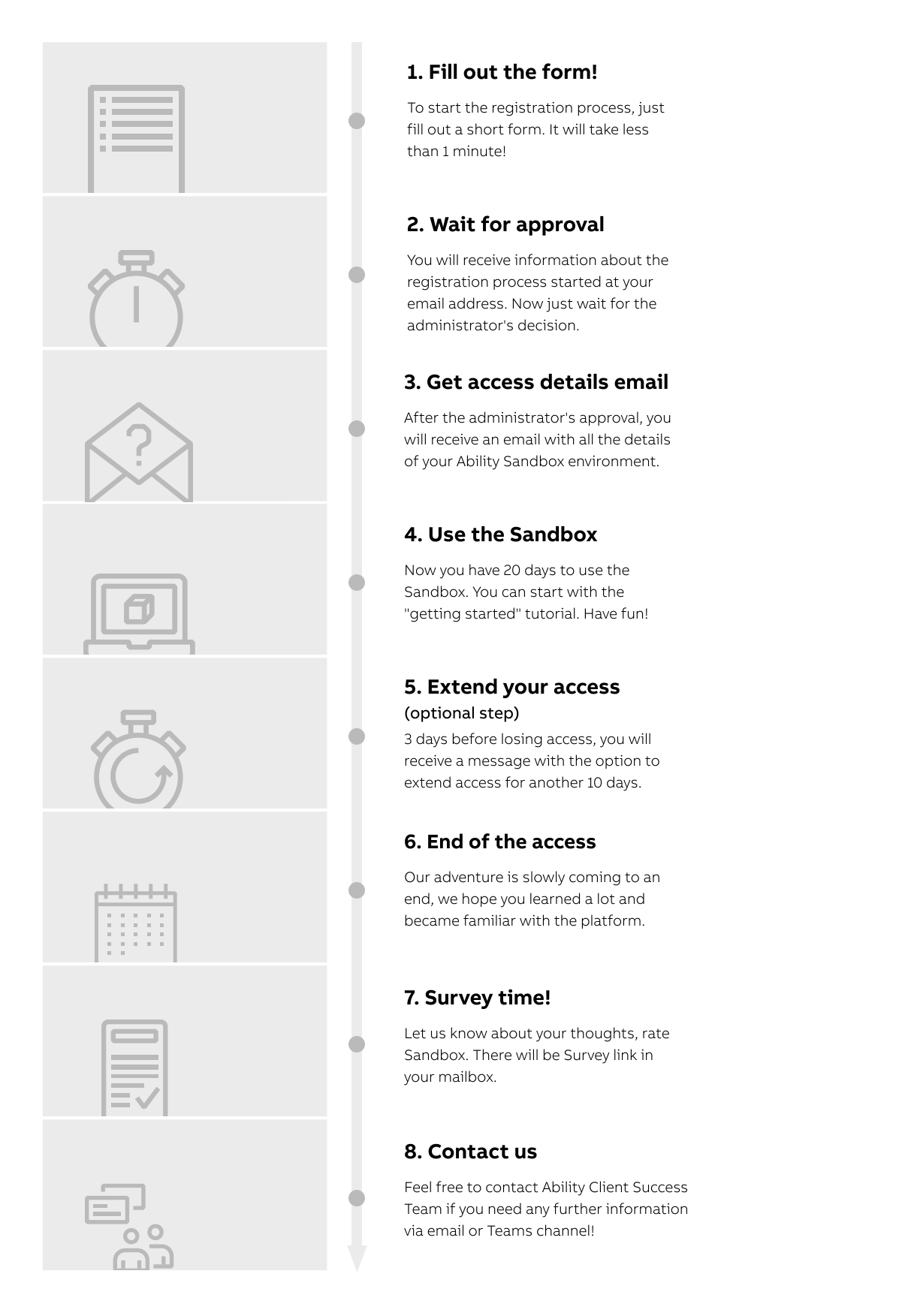
# Sandbox life cycle
For more details and a better understanding of the process, please refer to the life cycle infographic.
# Summary
There are a few ways how you can start your adventure with Ability Platform. You get access to the Ability Developer Portal, which is a documentation of the Ability Platform; API Playground, which allows you to experiment with the APIs; and finally you have an option to request a private Sandbox Environment, which allows you to see what it's like to develop an Ability-based solution.
Have a great learning experience! Feel free to drop us a message with your
thoughts/comments.
We'd appreciate any feedback from you.
New Teams channel has been defined specifically for this purpose: Ability Platform Sandbox.