
# Ability APIs
Ultimately, the purpose of the ABB Ability™ Platform is to add value for ABB, its partners, and its customers by collecting device telemetry and asset data and storing it in the cloud. This is usually done by developing custom applications that target individual markets, segments, or even customers.
The variety of use cases and demands by customers are domain-specific and outside of the reach and scope of the Ability™ Platform Team. The role of the Platform is to provide functionalities that would become a fundament on top of which your solution could be built.
Webinars
We recommend you to watch the following recording to gain a better understanding of the topic:
The listing of all webinars can be found here
# Overview
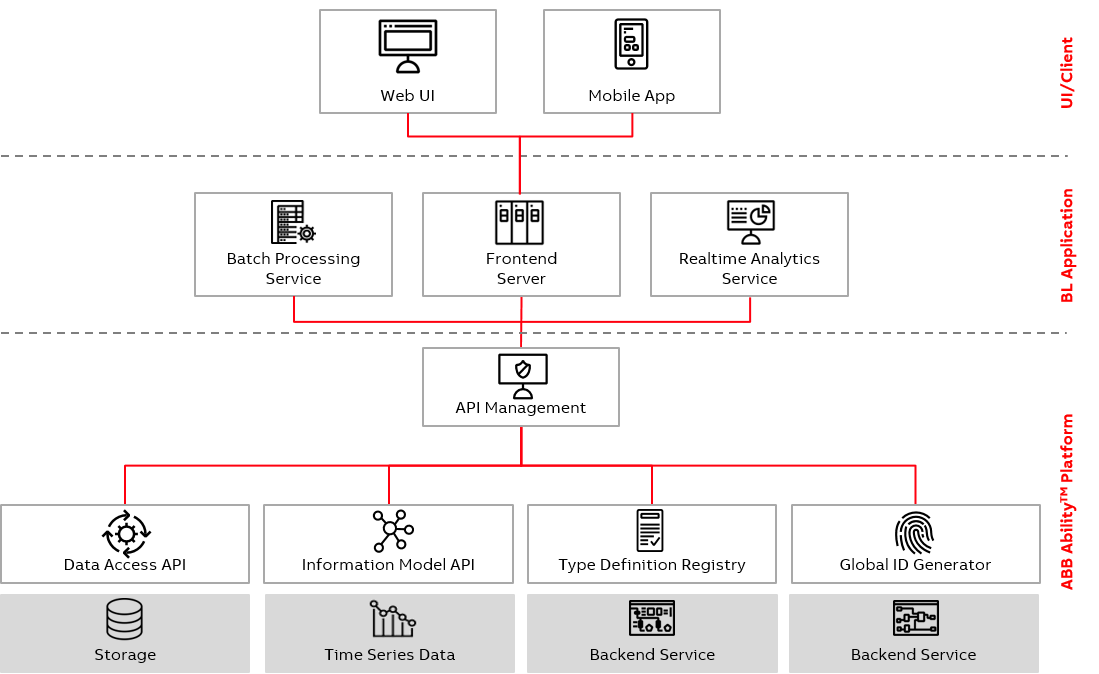
The Ability Platform provides its users with a comprehensive set of APIs to help make it easier to build impactful solutions. The available set of endpoints allow users a breadth of functionality to interact with live streaming data, stored data, object models, as well as manage their security and permission settings.
From the developer's perspective, Ability Platform consists of a range of APIs that are meant to aid ABB businesses with developing their solutions. One could argue that it's more than that - after all, Ability Platform also offers an Admin Portal, which is a web application with GUI. However, it's important to note that this application uses Ability APIs in the background (namely the Region API) and all of the functionalities that it offers could be achieved with HTTP calls to the right endpoints!
Since we're dealing with an IIoT Platform, the available APIs span from the cloud, down to the factory level where devices are present. This part of the Ability Developer Portal covers all of them:
# Cloud APIs
- Instance API - this HTTP API will be your main interest while developing web, desktop or mobile applications. It gives you access to the actual business data that your solution requires - models, telemetry, etc. A practical example - if you wanted to see what was the temperature of some electric motor connected to Ability Platform, you would use this API.
API Playground
One of the offerings of ADP - API Playground - allows you to try out the Instance API endpoints of the latest released Ability Platform from within ADP. Feel free to use it to learn about Instance APIs interactively.
Region API - this HTTP API gives you access to the access management features of the platform. Some examples of its functionalities include:
- management of the applications in your solution;
- management of the tenant users (i.e., their permissions).
As mentioned previously, Admin Portal is built on top of this API.
# Device-level APIs
Device API - a set of Azure IoT Hub message specifications that will allow you to build a directly connected device. Say, your goal is to connect some motor to the Ability Platform to gather telemetry data about its health. Device API would allow you to do so, giving you an interface between the device and Ability Platform cloud.
Edge Module API - it is used when your devices rely on Ability Edge for communication with Ability Platform. It provides an abstraction above the Device API that we listed previously. Instead of making your devices "talk" with the cloud directly, you connect them to an Edge device, which acts as a gateway between your devices and the Ability Platform, enabling various capabilities that can be all listed under the Edge Computing term. As a developer, you would be creating Ability Edge modules that communicate with Edge's Agent/Proxy using Edge Module API.
Ability Edge vs custom implementations
In most cases it is recommended to design your devices-to-cloud communication using the Ability Edge framework. It takes care of many issues that you'd have to deal with by yourself if you took the route of Device API usage (mostly related to security).
# Environment Setup
Before the Ability Platform instance can be utilized, an Ability Solution must be requested. A Solution can be seen as a container for various entities that you will want to create - application identities, grants, devices, etc. With the Solution defined, the Ability Platform is ready for development tasks. The steps to request, configure and verify a Solution are covered in the following articles in this section of ADP.
TIP
In the following articles of this section, we go through a simple example of environment setup, just as a reference. It is recommended that you contact your Client Success Team representative to establish what configuration will be optimal for your case. The only article that is valid in every case in this section, is the VNet Peering. Otherwise, feel free to learn about the available APIs, by navigating to the appropriate sections using the sidebar on the left.
The Ability Multitenant functionality defines different types of users. It is important to understand these terms before looking at an example configuration.
- Ability Administrator
- Solution Administrator
- Tenant Administrator
- Tenant User
All of these roles are described here.
Once an Ability Platform Instance is requested and the environment is delivered, this information can be used to request your solution. The following sections go through the basic steps to complete the solution creation process.
# Request Solution
Using your instance information, a ServiceNow ticket must be opened with Ability Operations to create your solution. Solutions support connections to multiple Tenants. The Ability Platform supports Azure Active Directory B2C. In production, the tentants are typically the Azure Active Directories of the BL's customers. For development, a test Microsoft Tenant can be created. This basic setup requires at least two users:
- Tenant Administrator
- Tenant User
Once this is information is available, the ServiceNow ticket can be created to request your solution. This solution example provided will suppport:
- Two Roles. One all access role for the Tenant Administrator and a read-only role for the Tenant User.
- Two Tenants. BLs will monitor devices from multiple customers.
- Background application. This application will allow the BL to access the data from all tenants
- Single Page App application. All tenant users will use this to access the data in stored in their respective tenants.
These Multitenant configuration choices represent a small subset of supported functionality and many other configurations are possible.
# Configure Solution
Once operations has completed your solutions requset, the configuration can be completed. This includes:
- Defining the Roles and Grants
- Setting up applications to view all the solution data.
The solution configuration provides detailed steps to complete this task.
# Configure Tenant
Once the Roles and Grants are defined, you can notify the Tenant Administrators they can login to assign grants to their users.
- An Admin Role that provides permission to everything.
- A User Role that can access all the data collected.
The tenant configuration provides detailed steps to complete this task.
# Test Configuration
Once everything is configured, access can be verified. A small application has been provided that can be modified to verify access to the Ability Platform. Follow the instructions provided here to verify access.