
# Overview
Ability Edge is a framework that allows you to connect your devices to the Ability Platform. As a developer, you will be building Ability Edge modules. These are applications running on the Ability Edge device, implementing the functionality that you require, i.e.:
- communicating with your (legacy) devices (translating protocols);
- calculating analytics.
Devices that connect to the Ability Platform communicate with it using the Device API. However, your modules do not communicate with the cloud directly. Instead, they communicate with Edge Proxy, which acts as a "translation layer" between your modules and the Ability Platform. It means that your modules will not use the Device API. Instead, they will communicate with the Edge Proxy using the Module API. The illustration below shows you these layers:
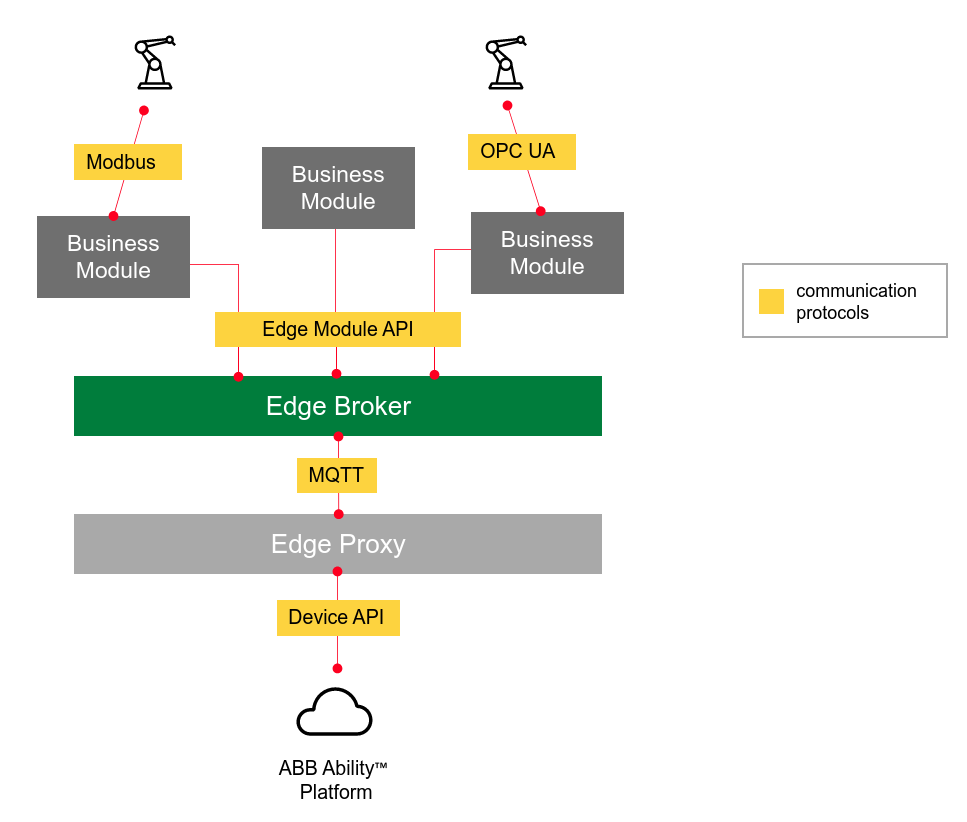
This image might seem upside-down with the cloud being at the bottom of the illustration. It was designed like that just to show you a bit better that the message that you send from your module, comes down to the Edge Proxy (via MQTT), and then it gets translated to a Device API message and it is sent to the Ability Platform via Azure IoT Hub. The same flow (but reversed) is executed when the message originates from the Ability Platform and targets your devices.
The illustration also shows the legacy devices that do not support the cloud protocols. They are presented just as an example, your devices could use completely different protocols.
One additional idea that we tried to show in the illustration is that Ability Edge framework may be seen as a multi-layered protocol-translation stack. The purpose of Ability Edge modules (at least one of them) is to translate industrial protocols of devices to the Module API (and the opposite). Then, the job of the Edge Proxy is to translate Module API into Ability Device API (and the opposite).
# MQTT Protocol
AsyncAPI is a specification based on the MQTT5 protocol which allows modules on Edges to communicate with each other. The introduction of MQTT5 offers many benefits, most notably the support for user properties. This makes it cleaner to add additional metadata or information without making it part of the topic or payload.
For a complete list of benefits of using MQTT5, see this summary of MQTT5 features.
The Ability Edge Module API is designed on top of MQTT. All of the supported operations are invoked via messages to and from specific topics. The following articles will show you the complete list of these topics, explain their functionalities, and give you examples of how to use them.
Your modules can interact with some of these topics in two ways: they can either publish information to them, or subscribe to them in order to retrieve messages. Subscribing to all the topics is not necessary. Make sure to choose the appropriate topics needed for your modules to operate properly.
The names of the topics and all the necessary information about MQTT connections are given to the modules via environment variables. You can find the variables that each module has access to on their respective pages.
# V1 and V2
Just like with Device API, our Module API now has two versions:
- Module API V1
- Module API V2
Of the two, we recommend using Module API V2, as it offers the same functionality and more when compared with Module API V1. Because of the extra benefits that API V2 offers, we plan on dropping support for API V1 later on in the future. You can stay in the loop by checking out the Release Notes.
Each module API has corresponding publish and subscribe topics. Business Line modules publish messages to the message broker which are eventually sent via an Edge agent to the IoT Hub invoking the corresponding Device V2 API. Acknowledgements are given back to Business Line modules after a response is received from the IoT Hub on a given request.
Each event message is detailed on its own individual page where you will find specific information about structuring requests and what typical responses look like. Each event has an added set of common headers required by the Ability Platform, and also those added by the IoT Hub which you can review below. Additionally, it is now possible to batch events together in V2 Device APIs. Please explore the new messages and details that are used.
# Enabling Module API V2 in your Edge
By default, only Module API V1 should be available to Business line modules. To enable API V2 support, you need to change the feature flag in the type definition configuration model of your Edge.
Enabling API V2
To enable V2 topics, you should make the necessary changes in the configuration section before setting up your Edge.
{
  "model": "abb.ability.configuration",
  "typeId": "abb.ability.configuration.edge.sample",
  "version": "1.0.0",
  "description": "Edge gateway configuration",
  "attributes": { ... },
  "properties": {
    "systemModules": {
      "edge-proxy": {
        "image": { ... },
        "configuration": {
          "apiVersion": {
            "description": "api version and mqtt topic version to be used, v1 or v2",
            "dataType": "string",
            "value": "v2"
          }
        }
      },
      "edge-broker": { ... }
    },
    "modules": { ... }
  }
}
Default Module API version
At any given time, only V2 or V1 module APIs can be made available to your Edge. By default, API V1 is enabled unless explicitly configured to V2 by following the above configuration.
# Message Properties
All Module API V2 messages for the ABB Ability™ Platform will share these common message properties in the request. These properties do not apply for Telemetry & File Upload requests sent from Edges.
All requests are idempotent, meaning that sending several identical requests will result in the same response being sent back for each request pending if the action was successful.
Some of the commonly used header properties along with their V2 messages may look like this:
| Property | Description |
|---|---|
| correlationId | Correlation identifier. Use UUID or any unique string for traceability |
| context | Context identifier. An arbitrary string used to identified the caller context |
| target | Path of a target device identity (needs to be registered via identity.create), if a module itself is not a target |
| ack | Default value: none Allowed values: all, none, positive, and negative |
| objectId | Object identifier |
| model | Model definition identifier |
Header properties can be added to any request by adding &{property-name}={property-value}
to the topic that you're sending your message to.
For example:
- Acknowledgement may be requested by adding
&ack=allto the topic to which you're sending your message. - Target can be included by adding
&target=blmoduleto the topic to which you're sending your message. - correlationId can be included by adding
&correlationId=fb372f49-1f53-4546-b4d8-e3940577dc5eto the topic to which you're sending your message and so on.
Multiple header properties can be added to a given message, as shown below:
- To add correlationId and Acknowledgement to you message, add
&correlationId=fb372f49-1f53-4546-b4d8-e3940577dc5e&ack=allto the topic to which you're sending your message.
# Correlation Id
In order to be unique, Correlation Ids are typically in UUID/GUID format. Because of how they are formatted, GUIDs provide a key to search the Platform's Application Insights, which is used for logging, for all the steps associated with your request.
Correlation IDs can be extended with a prefix or suffix to group all the requests from a device. For example,a device may send a burst of delete operations. A unique string prefix could be added to the correlationId to allow searching for all activities associated with the burst of deletes. Each delete operation would have a unique GUID, but the prefix would be the same the for all the deletes, e.g. TEST01.adf5d42d-9160-46d7-b4d1-e3482781ce01, TEST01.236cb401-3e98-4e0c-9b1a-ed1b5096a5a7, and so on. You can then request Operations via a ticket to look for the "TEST01" string in the correlationIds to find all the requests associated with your test scenario, and find the cause of problems that you may be having.