# Genix Manage Express Deployment Steps
Provides step-by-step instructions for deploying Genix Manage Express using Azure DevOps. Follow the outlined process to initiate and configure the deployment settings for your specific environment.
Getting Started:
Pipelines Location:
- Find the pipelines in Azure Repo by following this link.
Login:
- Log in using this link to start the deployment.
Run New:
- Click on Run New.
Configure the Form:
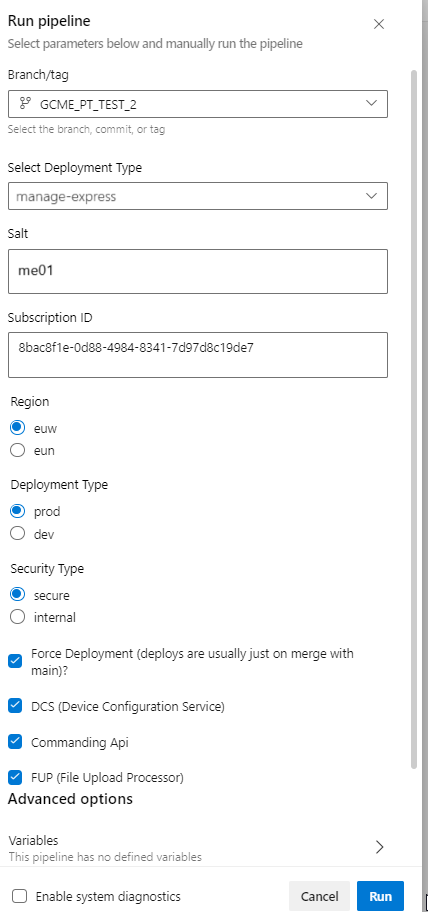
As you initiate the pipeline, a form appears, presenting the following configuration options:
- Select Deployment Type: Use the dropdown option and select manage-express.
- Salt: Enter me01 as a unique alphanumeric codename.
- Subscription ID: Use the subscription for GCME deployment.
Note: Do not modify anything else apart from the points mentioned above.
Start Deployment:
- Once you fill in the form details, click the Run button to initiate the deployment pipeline.
Monitor Progress:
- After the first pipeline, the rest start automatically. Keep an eye on progress here.
Note: Due to dependency on the existing Azure Infrastructure and Known issue in Azure Platform & Terraform we need to perform the below manual steps.
A. Manual Steps (if needed):
Pipeline2 - GCME-Pipeline2-PMApp-RG-B2C-EnvUpdate:Link
Check Conditions:
- If the pipeline runs for >20 minutes, reaches row 1850+, and shows "waiting...."
Follow Steps:
- Open Azure portal.
- Go to subscription: PADI_Genix_23.2.
- Find the resource group with the Salt name.
- Click on Azure B2C service: genb2c
euwprod.onmicrosoft.com. - Click Open B2C Tenant and log in.
B. After Manual Steps:
After the completion of the initial pipeline, the subsequent All Infra Deployment pipeline initiates at Pipelines - Runs for All_infra (azure.com), followed by the Application pipeline.
For any assistance or clarification during the deployment process, feel free to contact the support team.