
# Architecture overview
ADP Search
The search functionality in ADP is based on Azure Cognitive Search Services and uses Apache Lucene
for full-text searching.
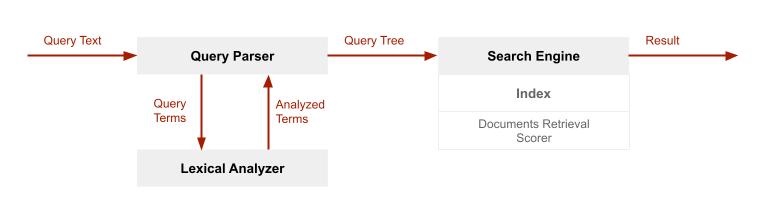
Processing a full-text search consists of the following stages:
- Query parsing
- Lexical analysis
- Document retrieval
- Scoring results
# Query Parsing
The Query parser is responsible for pasring queries and is a selectable part of the search solution.
For ADP purposes, we chose Default query parser, which supports simple query syntax.
Simple query processing does not support either fuzzy, wildcard or regex syntax.
Query parser deconstructs a given query into subqueries. ADP Search supports the following subquery types:
Term query- for standalone search phrases, such as "factory"Phrase query- for two or more word terms, such as "factory proxy"
In ADP Search, all query terms are always quoted, which causes the query to appear in searched documents
almost in the same form as was typed. Almost - because the proximity between words do not need to be immediate
and words in search can be separated by other "non-essential" words.
For example:
- If we want to find a phrase containing "Factory proxy", what should we expect in response?
"Factory proxy", "factory-proxy", "factory and proxy", "factory, proxy" and so on.
- We definitely wouldn't receive:
"fact. proxy", "factory pro." and so on.
Assuming that we put "Factory proxy" at the end of query parser work, the following "Query tree" arises.

# Lexical analysis
The Lexical analyzer processes text included in term and phrase queries and changes them to tokenized terms.
The most common form of lexical analysis is linguistic analysis, specific for a given language.
The linguistic rules specific for English (the only language used in ADP):
- Reducing a query term to the root form of a word
- Removing "the", "and", "or", "-" and other non-content/function words
- Breaking composite words into component parts ("multitenant" and "multi tenant" are linguistic equivalent)
- Uppercase words are changed to lowercase
ADP uses the Standard Lucene text analyzer with lexical rules described in
Unicode Text Segmentation.
The result of lexical analysis is "Improved Query tree", which is sent to the Search Engine to process
with documents retrieving. "Improved Query tree" looks like:

# Document retrieval
This is the place where Search Index appears on stage. Primarily, let's clear up document indexing. A Search Index structure consists of fields that can be searchable, filterable, sortable and so on. Fields are filled based on data source content.
Blob storage
ADP Search stores documents inside blob storage. Those documents are appropriately transformed ADP pages.
Index fields preserve body content and meta tags of html files.
The unit of storage is an inverted index, one for each searchable field. Within an inverted index
is a sorted list of all terms from all documents. Each term maps to the list of documents in which
it occurs. To produce the terms in an inverted index, the search engine performs a lexical analysis
over the content of documents, similar to what happens during query processing:
- text inputs are passed through an analyzer, changed to lowercase, stripped of punctuation, and so forth
(depending on the analyzer configuration) - tokens are the output of lexical analysis.
- terms are added to the index.
Main Index fields defined for ADP Search:
keywordsof document (meta tag)titleof document (meta tag)descriptionof document (meta tag)contentof document
The same Lexical analyzer is used at the time of search index building and search query execution
in order to maximize the searching efficiency.
Inverted index for field Content may looks like:
| Term | Documents |
|---|---|
| factory | UUID=1, UUID=3, UUID=5 |
| proxy | UUID=1, UUID=5 |
Inverted index for field Description may looks like:
| Term | Documents |
|---|---|
| factory | UUID=6, UUID=9 |
| proxy | UUID=6, UUID=8 |
# Matching query terms against indexed terms
Matching is processed for each searchable field.
For term query, matching is simple - we retrieve all documents, for term matched.
For phrase query, the phrase is divided into terms. Only documents with matching terms
are considered. At the end, the proximity of terms is checked, as described above.
Let's assume, that documents with UUID=1, UUID=5 and UUID=6 meet the conditions of closeness. Still the open question is, which document will be displayed as first. To answer this question, we have to pass through the Scoring stage.
# Scoring
Every document in a search result set has a relevance score assigned.
The purpose of the relevance score is to rank higher those documents that best answer a question,
defined by the search query.
The score is computed based on statistical properties of terms that matched. At the core of
the scoring formula is TF/IDF (term frequency-inverse document frequency).
In queries containing rare and common terms, TF/IDF promotes results containing the rare term.
Also important thing is weight of each field, defined in scoring profile definition.
Search term found in more weighted fields are more important than the same term, found in less weighted field.
If a term is "more important", then obtains better score.
ADP uses scoring profile with the following definition:
| Field name | Weight |
|---|---|
| keywords | 5.0 |
| description | 2.5 |
| title | 1.5 |
| content | 1.0 |
According to the above, answering the question, what will be the order of documents in our search result:
- UUID=6
- UUID=5 ("proxy" is less popular than "factory")
- UUID=1
# Search performance tuning
Azure Search offers additional functionalities, which help the user to be more effective at searching.
All of them supplement core search functionality and don't replace it.
The most important are:
Filters- for limiting the scope of searched documents. Utilized at core search.Suggestion API- to deliver the context of searched terms/phrases. Used before core search.Autocomplete API- to finish a partially typed query input using existing terms in the search index. Used before core search.
ADP Users
We are exposing Filters and Autocomplete API to ADP users.
# Filtering
Available filters correspond to ADP content structure and include the following scopes:
- Platform
- Cloud
- Devices
- API
- Edge
- Operations
- Releases
All of the above are selected by default, but you can mix them however you like. Deselecting all and choosing something else
narrows down the scope of searching.
# Autocomplete
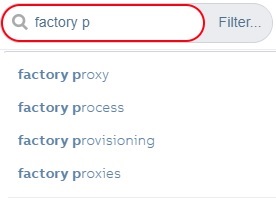
Autocomplete API is activated after 0.5 seconds of inactivity when typing your search query. The number of
suggested terms/phrases is limited to 5.
Autocomplete mode is set to oneTermWithContext, which means that suggested phrases can consist of two terms maximum.
Recommendation
Using Autocomplete is not mandatory but is recommended.
# Highlighting
Comfortable viewing
Additional custom functionality that makes viewing ADP content more comfortable is Highlighting
terms/phrases in viewed ADP pages.
Highlighting can work in two modes:
- automatically enabled after selecting destined page from search results.
- manually enabled by typing appropriate formatted URL in browser. Is enabled in context of page, indicated in URL.
To manually enable highlighting, use the following URL:
https://clientsuccess.ability.abb/<address-of-page>?hl=<search-phrase>
# Promoting articles
We encourage you to use static search phrases, which are available from the search drop-down list. That's how
we are going to expose the most recent or most interesting content.